Invoice Maker & Estimate Maker
- 4.6
- Rating
- 100.00K
- Installs
- Free
- Price
 Analysis by App-foxy
When I need to send a clean estimate or invoice without opening a full accounting system, Invoice Maker & Estimate Maker feels like the kind of practical tool I would keep on my phone. It is a free business app from Wow Invoice LLC, aimed at freelancers, small service providers, and anyone who occasionally needs to turn a job description into a professional-looking payment request.
My first impression is that it focuses on the immediate task rather than trying to become an entire finance department. You create an estimate or invoice, add the relevant work, and prepare it for sending. That narrower purpose is important: it makes the app easier to approach than a larger bookkeeping platform, but it also means I would not treat it as a complete replacement for accounting software.
The app has a 4.6 average from around 3.4 thousand ratings and more than 100 thousand installs, which suggests that its simple workflow appeals to a substantial number of users. It is rated for Everyone, so the presentation is accessible rather than aimed at a specialist financial audience. The current version is 1.80 and it requires Android 9 or later.
You May Also Like

 Blood Strike: 2.5 Anniversary
Blood Strike’s Loadouts Turn Every Drop Into a Tactical Gamble
A close look at Blood Strike’s custom loadouts: how fast access to signature weapons reshapes its battle royale rhythm, rewards preparation, and narrows the gap between fights.

 Pandora - Music & Podcasts
Pandora’s Music Is Easy to Start, but Harder to Recover
Pandora’s strength is its low-effort path from a seed to a station. Its weak spot is how much confidence it asks you to place in connection, setup, and quiet recovery.

 8 Ball Pool
8 Ball Pool Is Built on Rivalries, Rematches, and Routine
A close look at the rivalries, rematches, shared routines, and unanswered safety questions that turn a quick pool match into a persistent mobile community.

 Samsung Music
Samsung Music’s Quiet Strength Is Playing What You Already Own
Its reach comes less from spectacle than from dependable access to a personal library. That simplicity is both the app’s strongest retention engine and its ceiling.

 AccuWeather: Weather Radar
AccuWeather Review: A Quick, Clear Forecast for Everyday Decisions
For everyday plans, the best forecast is the one you can understand quickly. AccuWeather makes rain timing, radar, and local conditions easy to act on, with a few trade-offs.

 Hill Climb Racing
Why Hill Climb Racing Still Turns Crashes Into One More Run
A tiny car, a bumpy hill and one more upgrade: Hill Climb Racing keeps resurfacing because its simple chaos makes every near-miss feel personal.
More From Our News Desk



How the app fits into everyday invoicing
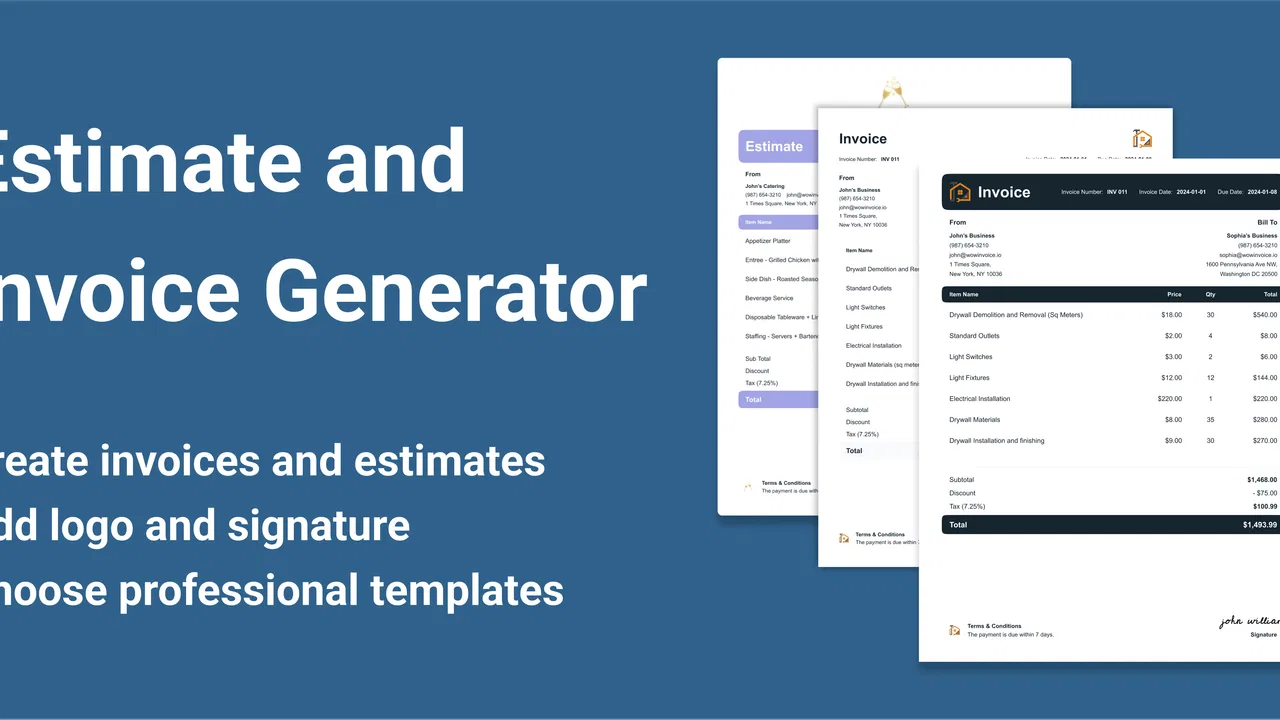
The most useful way to think about this app is as a mobile document maker for small business transactions. If I finish a repair, design task, cleaning visit, consultation, or other one-off job, I may not want to build a spreadsheet or configure a complicated accounting profile just to request payment. A focused invoice maker can remove that delay.
Estimates are particularly helpful before work begins. I can outline the expected service and cost first, then use the resulting document to make the scope clearer for the customer. After the work is approved or completed, an invoice serves a different purpose: it records what was actually supplied and what the customer should pay. Keeping those two stages separate is a small habit, but it prevents a common problem where an initial quote and the final charge become confused.
In a realistic situation, imagine a self-employed technician leaving a customer’s home after checking a faulty appliance. The technician may need to send an estimate for parts and labor before returning. With a phone-based tool, the document can be prepared while the details are still fresh, rather than waiting until the evening to recreate the visit from memory. That immediacy is where this app makes the most sense.
I also like the idea of using the estimate as a conversation tool, not just as a payment document. A customer can see the planned work in a more organized form than a text message. If the scope changes, creating a revised estimate is clearer than editing a long chat thread. The important discipline is to avoid treating an estimate as a final invoice: I would always check quantities, descriptions, and totals again before billing.
Free access and the paid boundary
The app itself is free to download and use, which makes it easy to test without committing money immediately. That matters for a new freelancer who is still deciding whether a dedicated invoicing tool fits their routine. The app includes in-app purchases ranging from $4.99 to $99.00 per item, so the free entry point should not be confused with every possible use being free.
That pricing range tells me to examine the exact purchase screen before relying on the app for a long-term workflow. I would first create a sample estimate, review the document, and test the sending process using non-sensitive information. Only after confirming that the free experience covers my normal needs would I consider paying for additional value. The right purchase depends on what the app places behind its paid options, and I would not assume that the most expensive item is necessary for a solo operator.
This is also where the app differs from a completely free spreadsheet. A spreadsheet may avoid in-app purchase prompts, but it usually requires more manual formatting and more care with formulas. Invoice Maker & Estimate Maker offers a more direct route to an invoice-shaped document, while the purchase structure may matter if I need more than occasional basic documents. For light use, the free starting point is attractive; for heavier use, I would compare the total cost with a dedicated subscription-based accounting service before committing.
What I find useful in the workflow
The strongest value is the reduction in friction between finishing a job and sending a formal request for payment. A phone is usually nearby when I am working, so a mobile invoice tool can be more practical than waiting to reach a desktop. This is especially useful for people who work on location and do not want to carry a laptop for a task that may take only a few minutes.
A second benefit is consistency. Rebuilding every invoice from a blank document often leads to uneven wording, missing details, or totals that are difficult to read. A purpose-built maker encourages a repeatable process. I can think in terms of the service, the charge, and the customer-facing document instead of spending time designing a page from scratch.
A less obvious advantage is the separation between writing and accounting decisions. When I prepare an estimate, I am defining the proposed work. When I prepare an invoice, I am recording the amount I expect to collect. Treating those as separate moments makes it easier to notice changes such as an extra visit, a different quantity, or a service that was removed. The app is most valuable when I use it as part of that disciplined sequence rather than simply typing a number and sending it.
Another practical tip is to prepare reusable wording outside the pressure of a live customer interaction. For example, I would decide how I describe travel, materials, revisions, or late changes before I need to issue a document. Clear descriptions reduce follow-up questions and make an invoice more useful than a vague line that only says “service.” The app can help present the information, but I still have to supply precise business language.
I would also review every document from the customer’s point of view before sending it. Is the work recognizable? Is the amount easy to find? Does the estimate clearly look like an estimate rather than a demand for payment? This final check is simple, but it is more important than visual polish. A neat document with an unclear description still creates confusion.
Where it may not be enough
The app’s focused design is both its strength and its limitation. Someone who needs inventory tracking, detailed expense management, payroll, tax reporting, bank reconciliation, or multi-user controls will probably outgrow it. A full accounting platform is a better fit when invoices are only one part of a larger financial system.
I would also be cautious if my business requires a carefully controlled approval process. A larger service may offer stronger collaboration, audit history, recurring billing, or structured access for employees and accountants. Those needs are different from quickly generating a document on a phone. Choosing a simple app for a complex organization can create more manual work later.
There is a second trade-off involving records. A mobile invoice maker can help produce a document, but I would still maintain a separate, reliable method for tracking whether each invoice was paid, when it was paid, and how it should be reported. I would not assume that creating and sending an invoice automatically solves bookkeeping. For a small operation, a basic ledger may be enough; for a growing business, dedicated accounting software is safer.
The purchase range also deserves attention. Free access lowers the risk of trying the app, but in-app purchases mean I should not build my entire process around an option before checking its cost. A user who only sends occasional invoices may find the free experience sufficient. Someone issuing documents every day should compare the paid value with alternatives that bundle invoicing into broader business tools. The cheapest starting point is not always the cheapest long-term choice.
There is also a human limitation that no invoice generator can remove: inaccurate input. If I enter the wrong customer details, omit a service, or fail to distinguish an estimate from a final bill, the app cannot judge the business context for me. I would use it as a structured assistant, not as an automatic accountant. That distinction keeps expectations realistic.
Who is most likely to benefit
I think this app is a good match for freelancers, independent contractors, mobile tradespeople, tutors, consultants, and small service businesses that need presentable estimates or invoices without a lengthy setup. It is especially appealing to someone moving away from informal messages and handwritten notes but not yet ready for a full accounting suite.
It may also suit a person who sends documents irregularly. A seasonal worker or occasional side-business owner may value having a dedicated tool available when needed instead of paying for a large platform all year. The free download makes experimentation straightforward, while the Everyone rating and Android 9 minimum make the technical entry point relatively approachable for compatible devices.
I would skip it, or at least compare it carefully with broader software, if I run a team, manage stock, issue recurring charges, or need detailed financial reporting. It is also not my first choice for a business where an accountant must work directly inside the same system. In those cases, the convenience of a mobile invoice maker may be outweighed by the need for shared records and deeper controls.
For a person deciding whether to install it, I would begin with one complete test cycle. Create a fictional customer, prepare an estimate, convert the work into an invoice conceptually, and inspect how comfortable the writing and sending steps feel. Then check how the app handles the information I actually need for my business. This test is more useful than judging it only by screenshots or by the fact that it is free to download.
My buying decision and final view
My verdict is favorable for straightforward, mobile-first invoicing. The best value here is speed and simplicity, not full financial management. If I need to make an estimate after a site visit or send an invoice without opening a desktop accounting package, this app has a clear reason to exist.
I would start with the free experience and delay any purchase until I know which part of my workflow it improves. Since individual in-app purchases run from $4.99 to $99.00, I would read each option carefully and compare the cost with the features I genuinely use, rather than paying simply because a premium choice appears more complete. That approach keeps the app’s value tied to real work instead of assumptions.
Compared with a spreadsheet, it promises a more purpose-built path to an invoice. Compared with full accounting software, it is likely to feel lighter and less demanding, but also less suitable for complex business administration. That middle position is its main appeal: it can be enough for a solo professional who wants cleaner documents and a quicker routine, while remaining the wrong tool for a company that needs an integrated financial system.
I would recommend giving Invoice Maker & Estimate Maker a careful trial if your current process is scattered across notes, messages, and improvised documents. Use it with accurate descriptions, keep an independent payment record, and check the purchase terms before expanding your use. For small, direct transactions, it can turn an awkward administrative chore into a manageable phone task. For anything beyond that narrow purpose, I would move to a broader business platform rather than expecting this app to grow into one.
FAQs for Invoice Maker & Estimate Maker
01What is Invoice Maker & Estimate Maker used for?
Invoice Maker & Estimate Maker is designed for freelancers, contractors, small businesses, and independent professionals who need to create business documents without complicated accounting software. You can prepare invoices, estimates, quotes, and receipts, add customer and service details, calculate totals, and share finished documents digitally. It is especially useful for users who want to manage billing from a phone while working on-site or away from a computer.
02Can I customize invoices and estimates in the app?
The app generally allows users to personalize documents with important business information, including a company name, logo, address, contact details, customer information, item descriptions, quantities, prices, taxes, discounts, and payment terms. Depending on the version and platform, additional layout or branding options may be available. Before downloading, check the current feature list because some customization tools may require a premium plan or in-app purchase.
03Can I send invoices and estimates to customers directly?
Yes, completed invoices and estimates can typically be saved or shared as digital documents, commonly through email, messaging applications, cloud storage, or other sharing options available on your device. This makes it convenient to send a quote before starting a job or request payment after completing work. Always review the document carefully before sending, particularly the customer address, totals, tax details, and payment instructions.
04Does Invoice Maker & Estimate Maker track payments or provide full accounting features?
The app is primarily focused on creating and managing invoices, estimates, and related billing documents rather than replacing complete accounting software. It may offer tools for marking invoices as paid, keeping basic records, or monitoring outstanding amounts, but advanced features such as bank reconciliation, payroll, inventory management, detailed tax reporting, and professional bookkeeping may not be included. Businesses with complex finances should use it alongside dedicated accounting software.
05Is Invoice Maker & Estimate Maker free to download and safe to use?
The application may be available to download for free, although certain features, templates, document limits, advertising removal, or advanced business tools can be restricted behind subscriptions or one-time purchases. As with any financial app, download it from the official Google Play Store or Apple App Store, review requested permissions, and read the privacy policy before entering customer or payment information. Avoid storing sensitive data unless you understand how it is protected.
Pros
- Create professional invoices and estimates directly from your phone.
- Useful templates help speed up recurring billing tasks.
- Track invoice status and outstanding payments in one place.
- Supports business branding with customizable invoice details.
- Convenient for freelancers and small businesses working on the go.
Cons
- Some advanced features may require a paid subscription.
- Mobile editing can feel slower for complex invoices.
- Tax and currency options may vary by region.
- Limited for businesses needing detailed accounting reports.
- Cloud backups and syncing may depend on account settings.

Invoice Maker & Estimate Maker
Gallery